
Getting started
Sign in to LinkedIn in Kachilu Browser
Understand the two sign-ins, confirm your LinkedIn session, and restore access when login or verification is required.
- Updated
- Published
On this page
Kachilu and LinkedIn require separate sign-ins
Your Kachilu account gives you access to the app. Signing in to LinkedIn allows Kachilu Browser to work with your LinkedIn account.
Being signed in to LinkedIn in Chrome or Safari does not necessarily sign you in to Kachilu Browser.
Open LinkedIn and confirm login
Follow these steps in SNS login during task creation. For an existing task, open the SNS login panel under Tasks & execution.
- Select Log in for LinkedIn.
- Sign in within Kachilu Browser.
- Check that the intended account can access the feed or another signed-in page.
- Return to the setup screen and select Login complete.
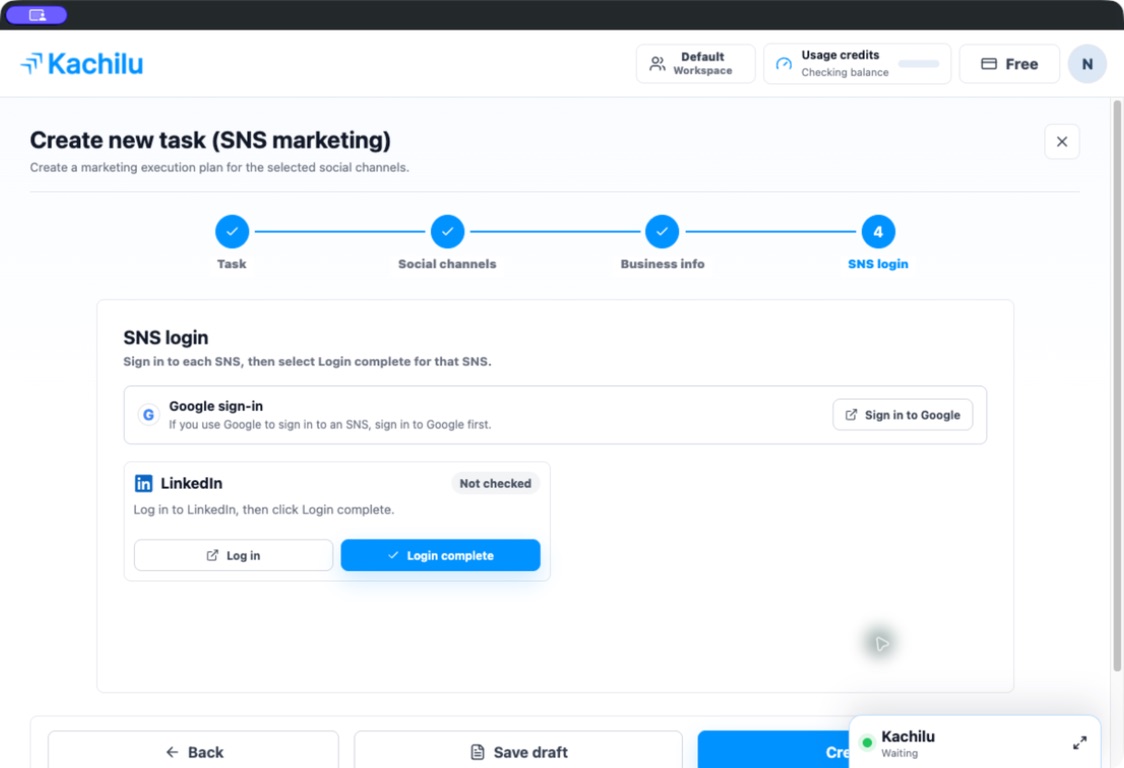
If you use Google to sign in
Select Sign in to Google in the SNS login screen and complete Google sign-in first. Then complete your LinkedIn login.
If a run requires login or verification
Check the request in Kachilu Browser and complete login or identity verification. Select Resume once the intended page is ready.
If you switch workspaces, check the LinkedIn session in that workspace as well.
Related articles
Still need help?
Tell us the app version, when the problem occurred, the task type, and the message shown in the app. Do not send passwords or verification codes.
Contact support