
4.0 / 5
Effortless automation and great design
The reviewer highlights time savings, an approachable setup, and an interface that makes automated tasks easy to follow—even for a first-time user.
Verified user in market research · Small business
AI-powered LinkedIn outbound
Build relationships first. Create pipeline next.
Enter your service URL and CTA URL. AI identifies whom to target and drafts personalized messages, then runs controlled LinkedIn outreach from relationship building through follow-up.








CUSTOMER FEEDBACK
Feedback published on G2 and Product Hunt about usability, execution, and control.
The reviewer highlights time savings, an approachable setup, and an interface that makes automated tasks easy to follow—even for a first-time user.
Verified user in market research · Small business
The reviewer values Kachilu as a practical way for a small business with limited in-house marketing capacity to turn a strategy into executable work.
Verified user in construction · Small business
 Md. Mehadi H.Community Manager (Remote)
Mehadi highlights automated prospect research, personalized outreach, and follow-ups with progress that is easy to monitor. He also notes that AI-generated copy may still need editing and would welcome more customization.
 Jeremy ClarksonProduct Hunt community
Jeremy says the pause, resume, and human handoff controls won him over because they reveal what the agent is doing instead of leaving users guessing.
WHY LINKEDIN OUTREACH STALLS
Finding LinkedIn prospects, researching every profile, building familiarity, and writing relevant messages—small tasks pile up before a pipeline ever starts to form.
Teams still search for companies and decision-makers one profile at a time.
Company details, role, and recent activity all need to be reviewed before outreach.
Each company and decision-maker needs a message written for their context.
Research, connections, messages, and replies are scattered across tools.
AI can speed up research and writing. But many tools still require approval for every action, so execution stays with your team.
Automate the work behind revenue-generating conversations.
How to get started
Enter your service URL and CTA URL. AI reads both pages and automatically decides who to target, what to send, and how to sequence the outreach.
Kachilu reads both pages to understand your offer and desired next step.
Sign in to LinkedIn through the browser inside the Kachilu app.
Kachilu automatically creates targeting criteria, personalized messages, and execution rules.
Relationship-first outreach
Kachilu finds the right prospects and coordinates a thoughtful sequence based on fit, timing, and response.
Search by your ICP and confirm each prospect fits.
Improve outreach success by building familiarity through thoughtful likes and replies before connecting.
Really useful perspective—especially the point about keeping personalization relevant.
Send a connection request after meaningful engagement.
Start with context—not a hard sell.
Hi Jordan—your post on pipeline quality stood out. Curious how your team is approaching outbound this quarter?
Share the right CTA when interest is clear.
Yes, happy to take a closer look.
See and control every action while it runs.
BETA RESULTS
The outreach Kachilu ran during beta and the approaches that progressed to a campaign-defined next step.
LinkedIn prospects approached
35,292
Estimated count based on 29% of initiated outreach
10,235
Share of initiated outreach that progressed to the campaign-defined next step
29%
Cumulative results recorded during the Kachilu beta period
Read the full 35,292-approach reportYour outreach. Your boundaries.
Review the message foundation, refine your audience, and share who not to contact. Practical controls, right inside Kachilu.
01Edit the template. Personalize for each recipient.
Edited excerpts from the Japanese desktop app, without personal information. Actual messages adapt the template to each recipient and conversation.
Pricing
Choose a plan that fits your team size and outreach needs.
Try LinkedIn outreach at your own pace.
¥0
No monthly fee
Build ongoing outreach with your team.
¥29,800
per member / month equivalent, excl. tax
A plan tailored to your organization.
Custom pricing
Terms tailored to your needs
Outreach counts are estimates and vary with the actions performed. Your agreement defines the actual credit allowance and member limit.
Kachilu desktop app
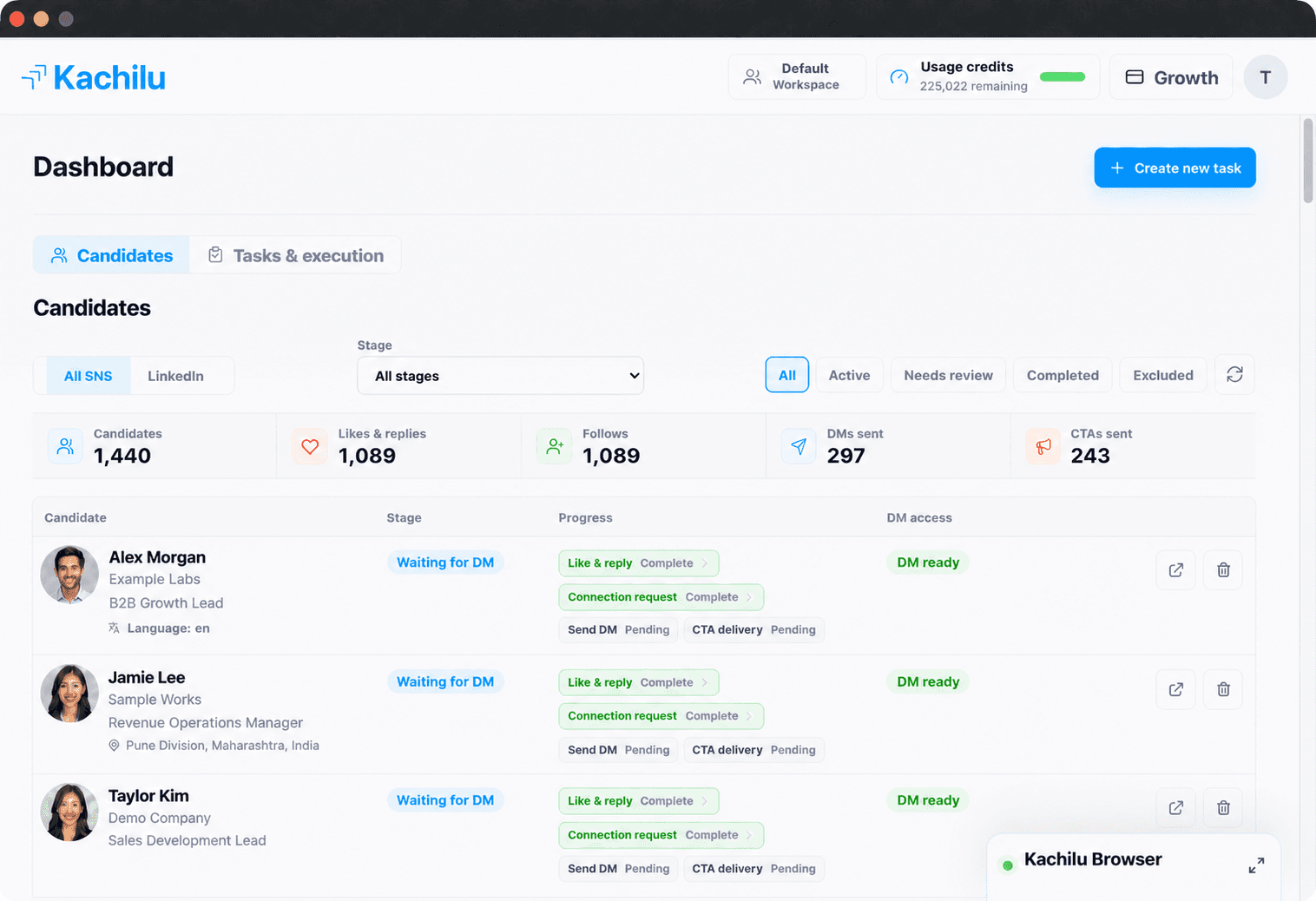
Review progress and message copy in the dashboard. LinkedIn actions continue in the built-in browser in the background, so they never interrupt your work.
See every prospect, stage, interaction, message, and reply in one place.
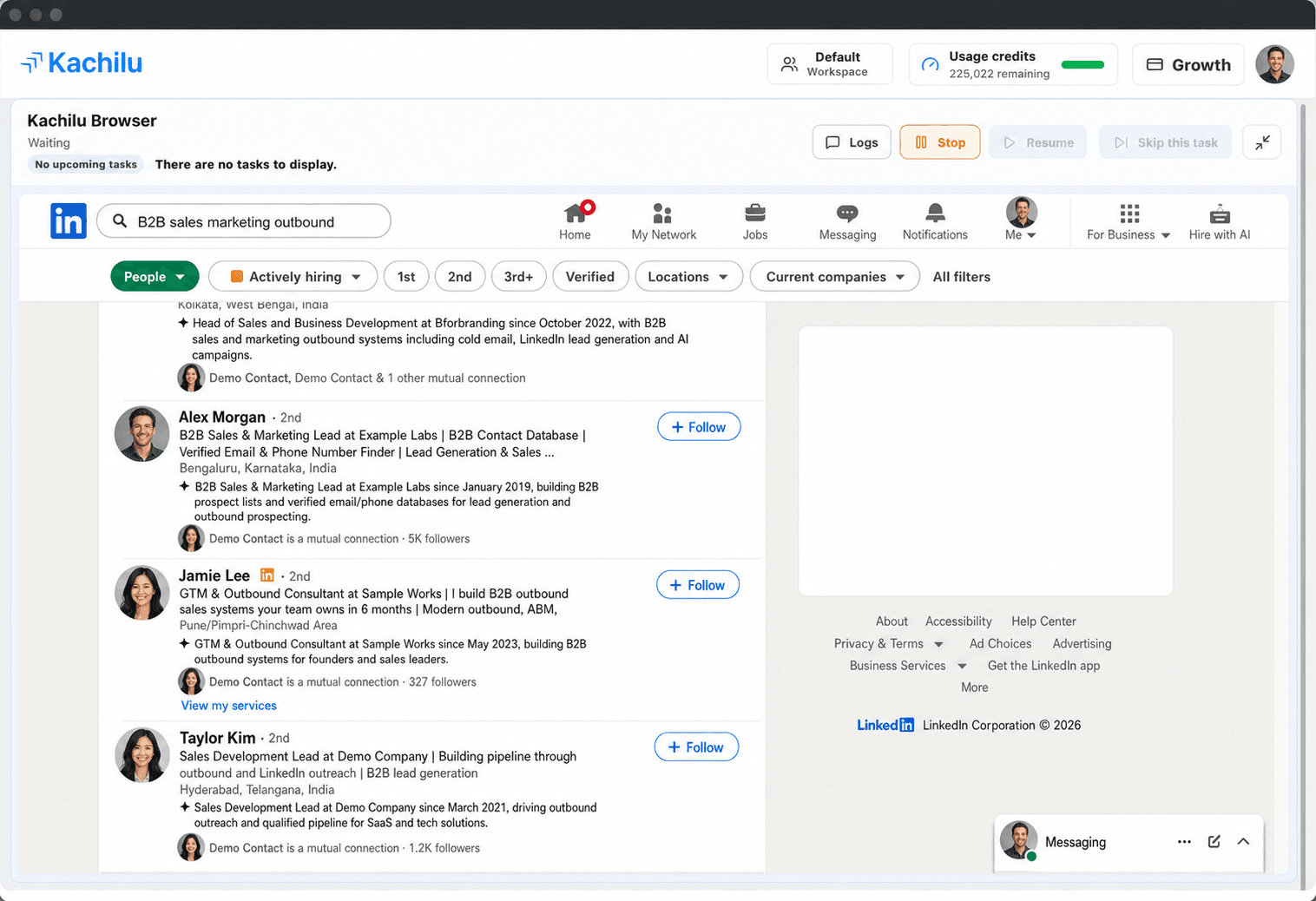
Kachilu’s built-in browser runs LinkedIn actions in the background, so your work keeps moving while you monitor or step in only when needed.
FAQ
Answers to common questions before getting started.
Yes. Kachilu automatically runs the outreach workflow you configure without asking you to approve each action. Unlike the per-action approval flows you may encounter in coding agents such as Codex or Claude Code, the workflow can continue unattended and be stopped whenever needed.
No. Kachilu does not use non-public data you enter or connect to the service to train its own or third-party general-purpose AI models.
Unlike tools that connect your LinkedIn account to a cloud-hosted browser, Kachilu uses your own IP address and a built-in browser installed on your computer. LinkedIn may require security checks or reauthentication when a sign-in comes from an unfamiliar location or device. Kachilu helps you keep your usual operating environment, while account access and cookies remain on your device.
Free supports one member. Pro supports 1–10 members and Enterprise supports 11 or more. Each member runs LinkedIn outreach from their own desktop, while the team shares prospects and progress.
Free includes 22,000 credits granted once with no expiry, one member, AI-personalized messages and end-to-end LinkedIn outreach. This is enough for approximately 100 people under standard conditions. No card or paid contract is required.
START WITH KACHILU TODAY
From LinkedIn targeting and relationship building to connection requests, personalized messages, and follow-up—let AI handle the repetitive outreach work.
22,000 credits once, with no expiry. No credit card required.