
Getting started
Set your service URL and CTA destination
Learn which URL Kachilu uses to understand your service and which URL it shares when a prospect shows interest.
- Updated
- Published
On this page
Use a page that clearly describes your service
Service URL is required. After SNS login, Kachilu analyzes this page to prepare targeting criteria and DM templates.
If your company offers several services, choose the page for the service you want to promote. It should explain who the service is for, the problem it solves, and what it provides.
Set the next step for interested prospects
The CTA is the next action you offer a prospect, such as visiting your service page or booking a demo. Select the purpose under CTA type and use a URL that matches it.
CTA URL is optional. If you leave it blank, Kachilu uses the service URL. Set it only when you want to direct prospects elsewhere.
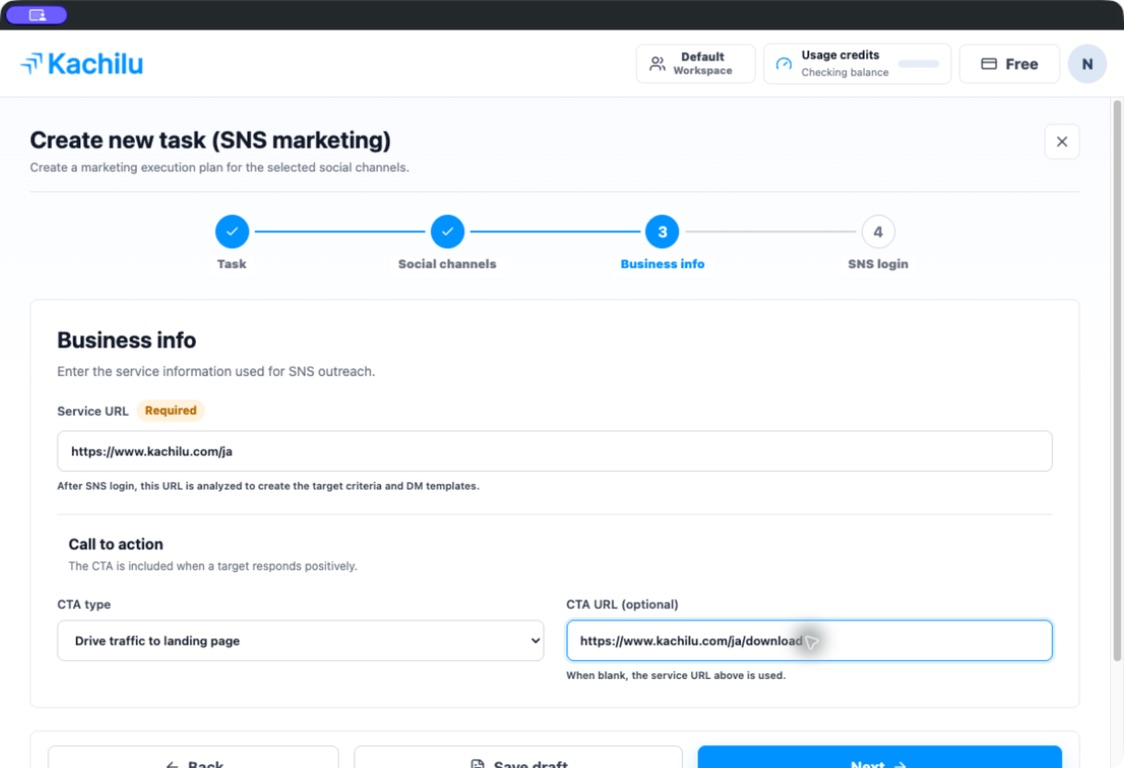
The CTA is used after a positive response
The setup screen explains that the CTA is included when a target responds positively. It is not a setting to send a link to everyone in the initial message.
Check that the wording matches the destination. A demo invitation should lead to a booking page; an offer of more information should lead to relevant service details.
Update the message when you change the CTA
After creation, open the relevant message task and its CTA and message template section. Save the new CTA, regenerate the template, and review the wording.
Resolve any Regeneration needed or Unsaved notice before the next run.
Related articles
Still need help?
Tell us the app version, when the problem occurred, the task type, and the message shown in the app. Do not send passwords or verification codes.
Contact support